MU Online Bound Wings Creation Guide
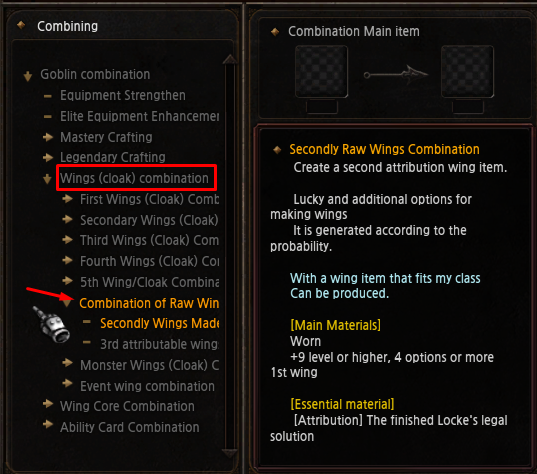
Bound Wings are created by filling a Loch or Condor Magic Solution to 100%, then combining the completed solution with a wearable wing of the matching order and character class at the Goblin NPC in Noria.
Bound Wings Guide Contents
Overview · Magic Solution · Magic Drops · MU Helper Auto Pick · Fill Solution · Create Wings · Wear Level
How Bound Wings Work
Wing option note: Although an eligible Bound Wing is completed at a 100% rate, receiving a wing option has a low probability.
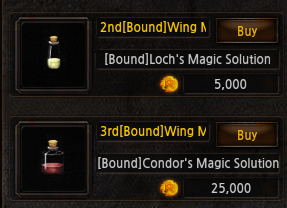
Purchase the Loch or Condor Magic Solution
Visit Priest James in Elbeland and open the Ruud Shop. Purchase the empty Magic Solution that matches the wing order you want to create.
How to Obtain Loch and Condor Magic Drops
Hunt monsters while carrying the corresponding empty Magic Solution. Different Magic Drops become available according to monster level, and the drops can only be collected while you have the appropriate solution.
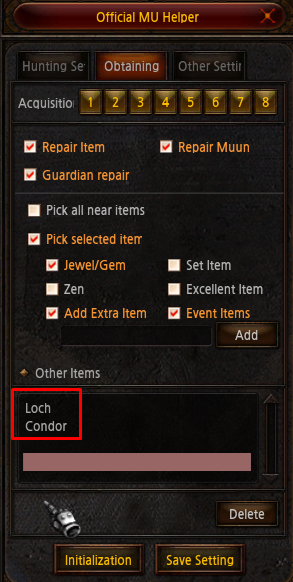
Add Loch and Condor to MU Helper Auto Pick
Open MU Helper with Z, enable item pickup and add the following partial item names to the Extra Item list:
Recommended: Use the short names Loch and Condor so MU Helper automatically collects matching Magic Drops.
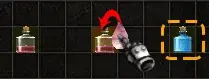
How to Fill a Magic Solution to 100%
How to Create Bound Wings
Bound Wings Quick Reference
Buy the Loch or Condor Magic Solution from Priest James → add Loch and Condor to MU Helper → hunt matching monster levels → drag Magic Drops onto the solution until 100% → take the completed solution and compatible wing to the Chaos Machine in Noria at 180, 102.